

The playbook for managing vulnerabilities is entrenched: scan, triage based on severity, and push patches. But in a world where Common Vulnerabilities and Exposures (CVEs) are expected to grow 300% over the next four years, this playbook struggles to scale.
Now, the security and IT teams staying ahead of the curve are exploring a new playbook. And they’ve realized something surprising: the key to vulnerability management in 2026 and beyond actually involves enlisting the help of their workforce.
This guide looks at the evolving view of CVEs, how they’re prioritized, and most importantly, how leading security and IT teams are driving a new approach to patch management. An approach that works not by hiring more IT specialists to handle patching but by decentralizing the fix.
What Is a CVE?
CVEs (Common Vulnerabilities and Exposures) are a global, community-driven framework for identifying and cataloging publicly known cybersecurity vulnerabilities. The CVE standard was created by MITRE as a reference catalog for categorizing and recording security vulnerabilities in software and hardware.
Each vulnerability is assigned a unique CVE ID, allowing security teams, vendors, and researchers to reference the same issue consistently across tools and platforms. CVE IDs are assigned by CVE Numbering Authorities (CNAs) – approved organizations responsible for issuing IDs and publishing validated records within their scope. While MITRE corporation serves as the primary CNA, many major vendors (Microsoft, IBM, Oracle), security firms, and research groups also act as CNAs.
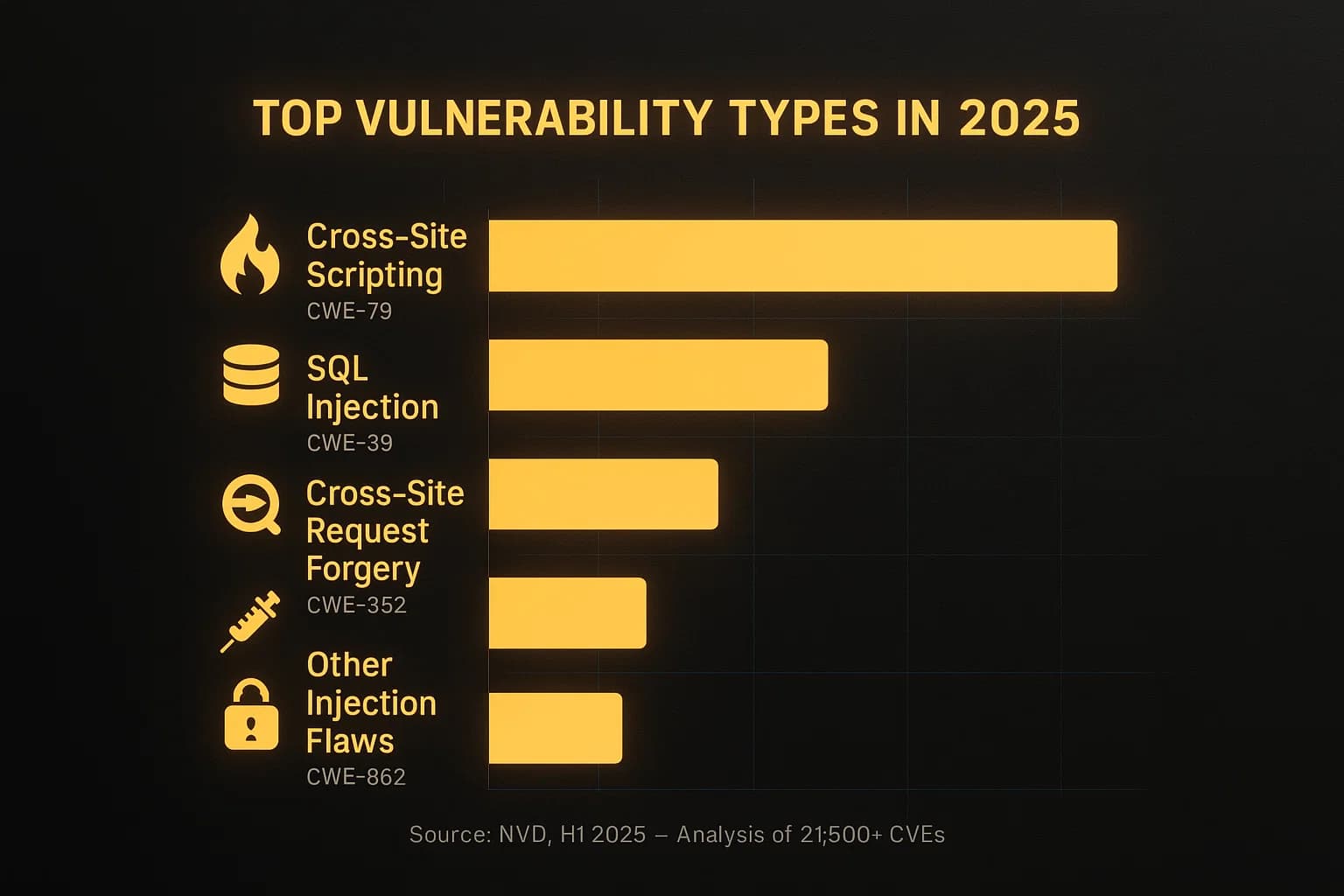
CVE records help organizations understand these weaknesses, prioritize remediation, and reduce the risk of breaches or operational disruptions.
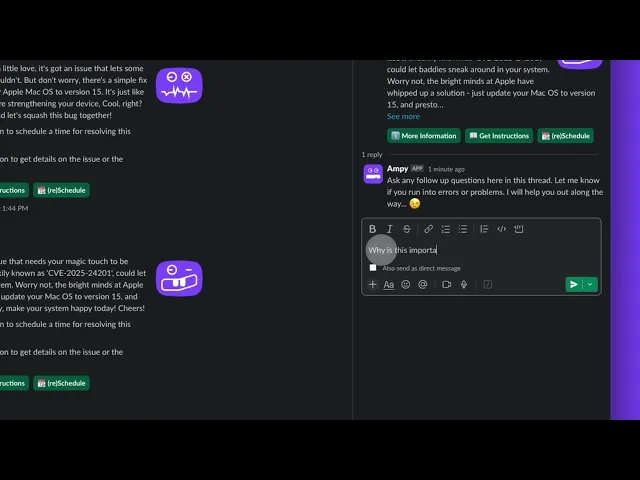
Of course, those are technical definitions. In practice, a CVE has come to take on a new identity, especially for modern endpoint security teams. A CVE is no longer just a vulnerability, it’s a required interaction with an end user. An email reminder to finish an update by restarting their laptop or a Slack message to walk them through the process of installing a patch.
This is an important distinction to make, because when the CVE is on an endpoint, IT is less equipped to silently fix things. The friction isn’t from finding the fix, it’s actually patching the hole, and this friction gets more severe in a world of exponential CVE growth.
When you need user action and buy-in, the way we think about vulnerabilities needs to change to reflect that. Especially because vulnerability scoring systems are no longer the signal through the noise that security teams can rely upon.
What Is the Common Vulnerability Scoring System (CVSS)?
A standard CVE entry includes a detailed vulnerability description, affected products, a CVSS score indicating severity, and references to advisories and patches.
CVSS score enables organizations to assess the severity of vulnerabilities. CVSS was first introduced by the U.S. National Infrastructure Advisory Council (NIAC) in 2005, but is now owned and managed by FIRST.Org, Inc.
CVSS rates the severity of a CVE on a scale of 0.1–10.0.
Score | Severity |
|---|---|
9.0 - 10.0 | Critical |
7.0 - 8.9 | High |
4.0 - 6.9 | Medium |
0.1 - 3.9 | Low |
CNAs add a CVSS score to CVE records when publishing them to the CVE list. The higher the score, the more severe the issue. The score helps organizations plan remediation measures and allocate resources accordingly. Organizations also use their own vulnerability-scoring systems to determine severity and prioritize patch management.
CVSS scores are derived from scores of four metric groups: Base, Threat, Environmental, and Supplemental which cover different aspects of a vulnerability.
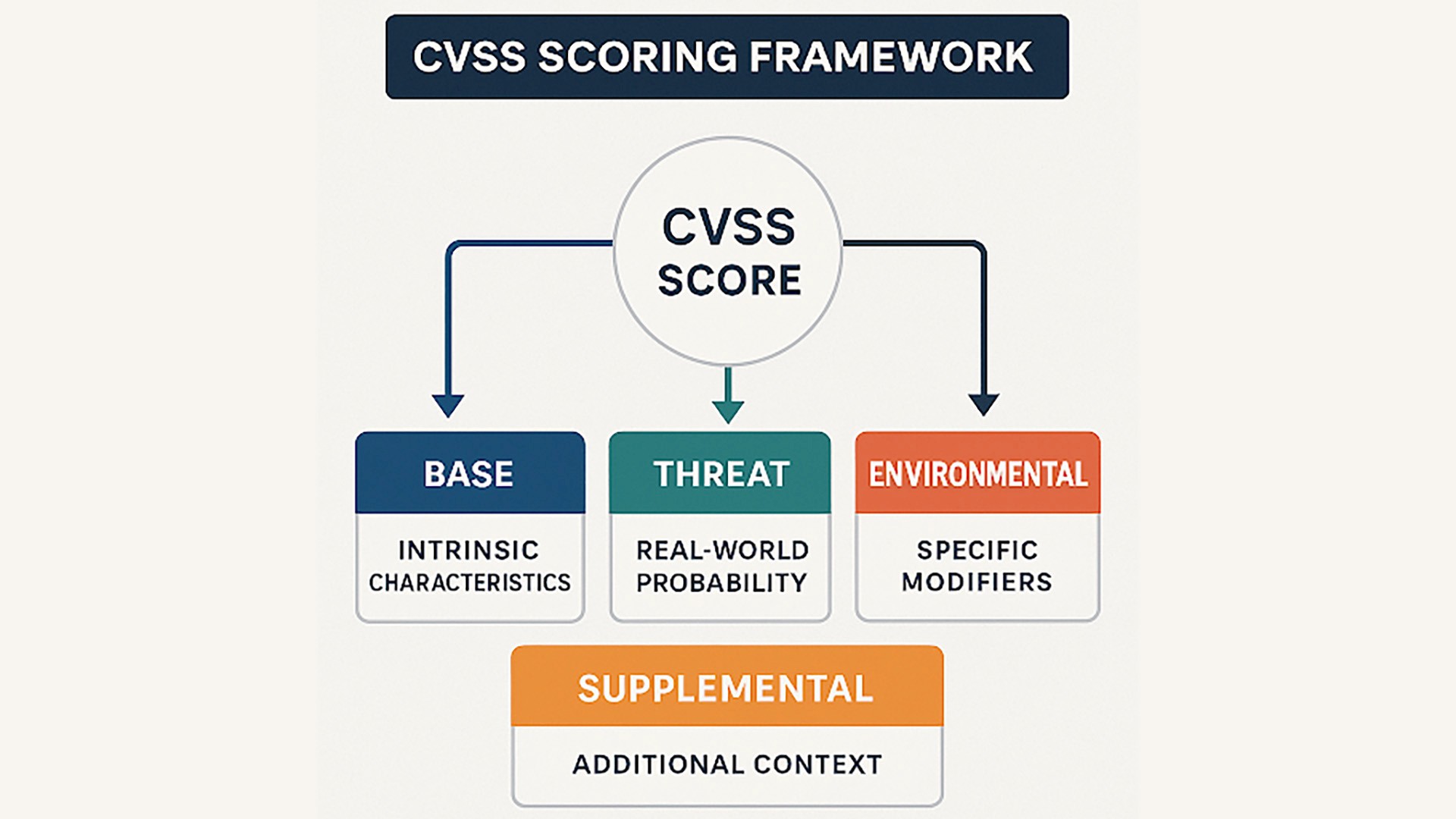
Base metrics evaluate vulnerability intrinsic characteristics that don't change over time, like how the attack can be launched and the level of system access the attacker needs.
Threat metrics account for factors that change over time, such as exploit availability and patch status.
Environmental metrics are specific modifiers based on an organization’s unique situation, such as whether compromised systems contain sensitive information.
Supplemental metrics in CVSS 4.0 include additional context for decision-making without affecting the numerical score.
In theory, CVSS scores should be the greatest asset for security and IT teams drowning in CVEs. When you’re staring down an impossibly big backlog that never stops growing, conveniently labeled and color-coded CVSS scores should act as your north star for prioritizing the most pressing vulnerabilities. Drop everything to fix Critical CVEs, try to get to High CVEs within the month, and cross your fingers on the rest.
But CVSS is increasingly a trap.
Attackers know these Medium severity vulnerabilities are just sitting there untouched. So now they’re increasingly chaining them together to exploit unpatched devices, giving them a foothold to launch even more catastrophic attacks. And with AI enabling attackers to get more crafty with convincing deep fakes and automated spearphishing campaigns, they’re able to exploit these vulnerabilities with far greater efficiency.
How to Create an Effective Patch Management System?
Traditionally, patch management involves detecting, obtaining, testing, and deploying updates for software applications, operating systems, and device firmware. This process is constantly under strain as limited time and resources clash against an ever-growing list of CVEs that the security team needs to patch before threat actors exploit them
If we accept that security and IT can’t scale to meet this threat, then it’s clear the patch management process needs to evolve. Security and IT must find a new model that builds off the foundation of proven best practices, streamlining deployment, protecting systems from exploitation, and minimizing disruption, all at once.
Key Components of an Effective Patch Management System in Today’s Operational Reality
An effective patch management system needs a few essential pieces working together to balance security with operational stability.
Complete Visibility Into Assets: Building a robust patch management system starts with comprehensive asset discovery. Catalog every hardware device, operating system, software application, and third-party tool across your environment since unknown assets create security blind spots.
A Discovery and Monitoring Process: Subscribe to CVE feeds and the National Vulnerability Database. Configure alerts for critical patches so your team learns about threats immediately.
Testing Environments: Never deploy patches directly to production. Build isolated environments that mirror your actual system configuration, where you can validate updates without disrupting business operations.
Automations: Roll out patches systematically, using automated tools with human oversight, for mission-critical systems. Always maintain rollback capabilities in case updates cause unexpected issues.
Tracking and Verification: Confirm successful patch installation, monitor post-patch performance, and maintain detailed records for compliance audits.
To optimize vulnerability management in a world of exponential CVE growth, you also need two new capabilities:
Human Risk Graph: A human risk graph adds internal context to CVEs, mapping device posture, application risks, and security tool coverage to human behavior. This gives you a better understanding of how adversaries can exploit users and your actual exposure.
AI Security Engineer: AI is the force multiplier for your security and IT team. It automates all the chase down and follow-up, enabling you to effectively distribute the patching and updating workload. And it can be tailored to your specific workflows and even your brand’s tone of voice.
Continuous Threat Exposure Management (CTEM): CTEM is a framework for proactively managing and mitigating threat exposures using security tools alongside structured processes. It helps answer the “why”, establishing the scope of assets that the organization needs to be most concerned with and validating whether identified exposures are actually exploitable.
The combination of a Human Risk Graph and AI Security Engineer is what differentiates the old model from the new model. Users increasingly hold the keys to the last mile of remediation – they are the ones who need to enable MFA, remove risky apps, and patch vulnerabilities. The additional human risk context aids severity scoring in ways that CVSS can’t, and the AI Security Engineer enables user-led remediation, eliminating friction and reducing the workload burden on security and IT teams.
Collaborative Efforts for Timely Deployment
CVE patching is a collaborative effort involving various stakeholders, both within and outside your organization. Silo and turf issues can delay patching by an average of 12 days. Timely, secure, and seamless patch management is possible through collaborative efforts. Define and document the roles and responsibilities of all stakeholders.
Security Operations Team: The key responsibility for patch management lies with your security operations team, led by an operations manager. They identify vulnerabilities, prioritize them by CVSS score, and formulate a patching strategy. The team is also responsible for risk management measures when a patch for a vulnerability is not yet available.
System Administrators: Your system administrators are responsible for patch deployment and ongoing monitoring. They work closely with the security operations team to minimize disruption and maintain stability.
AI Security Engineer: AI security engineers help scale remediation, especially for lower severity CVEs. Your AI security engineer can effectively message thousands of users at once, guiding them through remediation and wiping out thousands of vulnerabilities without a single ticket.
Quality Assurance Teams: They test the patches to ensure that issues are fixed and patching doesn’t introduce any issues in your IT environment.
Software Vendor: Software vendors are responsible for developing and releasing patches to address vulnerabilities affecting their products. When new vulnerability records are added to the CVE list, vendors test their systems to see if they are affected. They develop and release a patch fixing the issue.
Vulnerability Database Providers: They maintain databases of known vulnerabilities working in close cooperation with CNA’s, vendors and security researchers to document and spread awareness about them.
How To Prioritize Patch Management
The proliferation of interconnected devices and systems expands the attack surface, leading to rising vulnerabilities. With thousands of new vulnerabilities, your security teams need a risk-based approach that goes beyond CVSS scores. In addition to severity scores, prioritize risk mitigation based on factors such as real-world exploitation status, asset exposure and business impact.
Understand risk context
CVSS scores reflect severity but don't disclose whether a vulnerability is actively exploited or how it impacts your specific environment. Consider whether the affected system processes sensitive data, supports critical operations or is internet-facing. A human risk graph can also add valuable visibility into actual exposures and vulnerabilities, showing relationships and attack paths to help prioritization.
Prioritize based on real-world threat intelligence
If attackers are actively targeting a specific vulnerability, patch it immediately. Monitor trusted sources such as the CVE List, CISA's Known Exploited Vulnerabilities list, the National Vulnerability Database, and vendor security advisories. Assess vulnerabilities for active exploitation and mitigate them on priority.
Document and measure everything
Track metrics like time-to-patch for critical vulnerabilities, patch coverage rates, and systems with outstanding patches. It helps you identify gaps in your process and proves compliance during audits. Your human risk graph can also quantify metrics like mean-time-to-recovery (MTTR), tooling compliance, SAT training completion, and overall security health.
Use technology to scale
Manual patching doesn't scale. Automated patch systems deploy patches on schedule, reduce errors, and save time. Tools that continuously scan assets and generate prioritized remediation queues let teams focus on value-added tasks rather than administrative tasks. Your AI security engineer is another critical scaling tool, especially for user endpoints. AI can work with users to schedule the patch installation at the earliest convenience instead of turning to the “nuclear option” of a forced restart that could negatively disrupt business.
Test before deploying broadly
Patches can introduce compatibility issues or break functionality. Always test updates in a controlled environment before production rollout. Use staged deployments with critical systems first followed by lower-priority assets to minimize business disruption.
An effective patch management balances speed with smart risk assessment. By combining threat intelligence, asset context, AI, and automated workflows, security teams can focus resources where they matter most.
Example: How AI Turns Patching Pains into Security Gains
Many vulnerabilities require the user to make a mistake before they can be exploited. Not so for CVE-2025-24201, a vulnerability that allowed hackers to take full control of Apple devices simply by sending a malicious text. Apple worked quickly to roll out an OS update that fixed this issue, requiring users to reboot affected computers and phones to apply the update.
With the old model, security and IT had two options:
Spend time determining which devices are affected and messaging each employee over Slack and email, trying to convince them to complete updates and reboot their machines. This might also involve some education, so users understand why they need to stop what they’re doing and restart their devices.
Use a device management tool to force a restart. This is risky because forced updates disrupt business – unsaved work gets lost and critical presentations get interrupted. Employees may also have sensitive data on vulnerable personal devices that are outside of IT’s direct control.
With the new model, powered by a Human Risk Graph and AI Security Engineer, security and IT teams can quickly triangulate which devices pose the biggest risk and design an effective response plan. AI automatically engages the user base with guided remediation workflows and education. IT teams can also use the Human Risk Graph to follow up with particularly critical exposures - the CFO with access to critical financial data and payment systems that has a Critical severity vulnerability on their device. The whole response is calculated and quick, closing thousands of vulnerabilities without a single ticket.
Using Human Risk Context and AI for Better Vulnerability Prioritization and Faster Remediation
Modern vulnerability management requires looking beyond severity scores to optimize remediation. Assessing risk context, such as asset criticality and workflow disruption, is equally important. Human risk-based prioritization replaces one-size-fits-all approaches. AI-led, user-driven remediation is essential to neutralize the increasing volume of vulnerabilities without sacrificing productivity.
For years, security vendors have obsessed over the first mile of managing CVEs – better scanning, faster detection, more threat intel, automated patching. But ultimately, hyper fixating on the first mile doesn’t stop breaches. It’s the last mile where companies are increasingly exposed. A patch staged for install is functionally useless. A patch that is installed and running is secure.
The gap between those two states is controlled by the end user. That means modern CVE management isn’t about faster scripts and better automation – it’s about deeper human engagement at the moment of risk.
Amplifier Security automatically engages employees when risks are detected, guides them through remediation steps, and verifies fixes without creating tickets or disrupting productivity. With AI workflows and dashboards that surface human risk, you can effectively turn what attackers view as your biggest weakness – unengaged end users – into your biggest security asset.
Frequently Asked Questions (FAQs)
What is user-driven vulnerability remediation in practical terms?
AI-guided, user-driven remediation turns every employee into a security asset, assigning vulnerability fixes and patches to the people closest to them. The goal is faster remediation by changing who holds the wrench, all while maintaining control and visibility.
Which vulnerabilities should be remediated by the user?
Vulnerabilities affecting devices and endpoints like phones and laptops, as well as applications, are low-hanging fruit for user-driven remediation. Combining self-healing security workflows with a human-centric design enables security and IT teams to educate users while speeding remediation
How long does it take to see results with AI-guided remediation?
Most teams see measurable improvements within months of implementation. One Amplifier customer was able to close more than 2,163 issues through user-guided remediation in their first 90 days, saving the security and IT team 541 hours of work.
What breaks user-driven remediation most often?
User-driven remediation breaks when timing is inconvenient or when the stakes are unclear. AI-guided remediation resolves these issues by automating the update scheduling and educating the user on the vulnerability to encourage cooperation and prompt response.
Latest Blogs
Related Blogs & News



Watch