


Many security teams have a 100% encryption policy, but their actual security posture often says otherwise.
They have BittLocker and FileVault deployed. They have an MDM pushing encryption settings across the fleet. The gap is in the space between, where the MDM flags a disk encryption security finding that never gets closed.
Every security program has loose strings. The ones that sound fine in the noisy orchestra of your security program, but suddenly become obvious when they’re thrust into the spotlight by an auditor, underwriter, or attacker.
Disk encryption is one of the most common loose strings in an otherwise finely tuned security program. Here’s why it shows up in audits so frequently – and what it actually takes to get to 100% and stay there.
What Does Full Disk Encryption Do?
Full disk encryption (FDE) is a critical hardware-level defense that does exactly what it sounds like: every bit of data is encrypted, from the operating systems and applications to the temporary files and user data. Without the decryption key, a stolen laptop with FDE enabled is a paperweight, sensitive data inaccessible to attackers.
Software FDE is the undisputed champion for the vast majority of standard enterprise endpoints (user laptops and desktops). Common implementations are well established, and most companies go with the native OS FDE to keep things simple. These include:
BitLocker on Windows: Microsoft's native solution encrypts your entire hard drive, requiring a PIN, password, or TPM-backed key at boot to access data.
FileVault on macOS: Apple’s FDE encrypts the entire drive, from the system to user files. It unlocks with a user password or a recovery key, and it’s manageable remotely via MDM.
LUKS/dm-crypt on Linux systems: LUKS and dm-crypt provide block-level encryption with support for automated unlocking through network-based key servers or TPM integration.
When FDE is implemented correctly, it protects data at rest – especially when the device is powered off or in a locked state. It shuts down offline attacks, where someone attempts to boot from external media or remove a drive entirely to access the data. When physical security fails, FDE steps in as your last line of defense.
FDE, however, isn’t designed to protect data once a user has authenticated and the device is running. A logged-in laptop left unattended in an airport lounge is fully exposed. It’s also vulnerable to malware, ransomware, and anything else targeting users while the device is running.
FDE is necessary, but it’s not sufficient – it’s only one track of the security song. You should complement encryption with robust authentication to ensure the safety and integrity of your organization's data. Understanding these nuances helps you communicate realistic expectations to your stakeholders about why achieving 100% disk encryption compliance is crucial for your organization's security posture.
Why the FDE Compliance Bar Just Got Higher
Disk encryption has always been a security best practice. But now it’s increasingly a compliance requirement, enforced both by regulatory agencies and voluntary contractual agreements. And the language around disk encryption is tightening.
On the regulatory end, HIPAA’s Security Rule has long classified encryption as an addressable implementation requirement to protect electronic protected health information (ePHI). General Data Protection Regulation (GDPR) Article 32 mandates that data controllers and processors implement appropriate technical and organizational measures such as pseudonymisation and encryption of personal data.
What’s changing now is enforcement. PCI DSS 4.0 is the sharpest edge of this shift, with the recommendation for making disk or partition-level encryption mandatory for protecting Primary Account Numbers on non-removable media turning into a requirement. FDE compliance gaps now have even bigger financial implications.
Cyberinsurance is moving in the same direction. Carriers assess disk encryption during underwriting, and they’re looking for technical proof, not self-attestation questionnaires. If you can’t demonstrate fleet-wide compliance with evidence, expect coverage reduction or even automatic denials.
Even the interpretation and expectations around voluntary attestation frameworks like SOC 2 are tightening. With the explosion of remote and hybrid work, critical corporate endpoints are operating outside the firewall for extended periods – maybe even permanently. This leaves FDE as the only reliable form of protection, and it’s why enterprise customers and partners demand encryption verification. Gaps here create serious business risk.
With the global average breach cost reaching $4.4 million, avoiding notification requirements saves you substantial money. But equally important, when data is encrypted and keys secure, it also reduces disruptive notification obligations. The financial case for encryption has always been strong. The compliance just made it non-negotiable.
The Elusive 100%: Why Organizations Fall Short of Fleetwide Full Disk Encryption Compliance
BitLocker ships with Windows. FileVault is on every Mac. LUKS is available on every major Linux distro. Most organizations also have MDM platforms, like Jamf and Intune, to push encryption policies and detect noncompliant devices.
So if encryption technology is free and already installed, and organizations also have advanced MDM capabilities… why do security teams struggle to reach 100% FDE compliance?
The reality is that most security stacks are built for pushing policy and detecting gaps, but not closing them. MDM can flag problems, generate an alert, and feed the finding to a compliance report, but these gaps don’t always fix themselves. And sometimes forced updates and policy issues are actually what creates these problems in the first place.
The result is predictable: findings accumulate faster than they get resolved. Devices drift out of compliance, users defer prompts, and new machines get provisioned with misconfigured policies and key escrow errors. Reports show the gaps, but IT teams don’t have the headcount to do the tedious work required to resolve them.
This challenge gets further amplified across heterogeneous environments and legacy infrastructure. Windows machines and Macs managed by IT, Linux workstations by engineering, each platform with its own encryption implementation, enablement workflow, and key management requirements, all managed by a mix of legacy on-prem and modern cloud MDM solutions. This leads to even more edge cases, where policies collide with the mess reality of the operating system.
These loose strings in FDE policies aren’t a technology problem, they’re a process problem that modern security stacks weren’t designed to cover. For most security teams, these loose strings might be pulled tight enough to sound good most days. But with scrutiny ratcheting up, they unravel fast.
Closing the Loop, Not Just the Alert
The more effective approach to closing these encryption compliance gaps doesn’t rely on more forced MDM pushes. It keeps humans informed and involved while eliminating the manual (and often boring) work that causes these gaps to linger.
That’s the model Amplifier’s Loose Strings track is built on – and it augments what MDM enforcement alone can do.
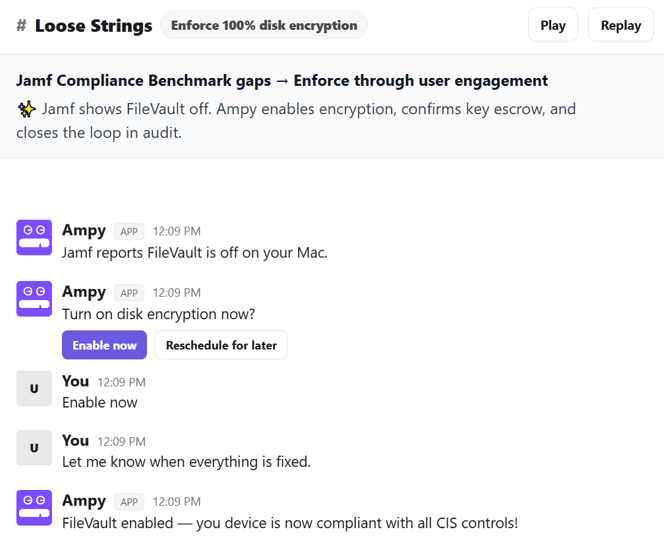
Continuous monitoring means Amplifier watches encryption status across your fleet in real time, pulling signals from Jamf, CrowdStrike, and Microsoft Intune. When a device falls out of compliance, whether it’s FileVault getting disabled or an escrow key that needs to be reissued, the gap surfaces immediately, not during your next audit.
Human-in-the-loop remediation is where Amplifier builds on traditional MDM enforcement. Amplifier uses an AI Security Engineer named Ampy to guide end users through remediation processes directly, working across the complete workflow from enabling FDE to confirming recovery key escrow. Ampy then closes the audit loop in the same workflow, all without IT having to open a ticket or spending time with the end user.
Persistent follow-through means employees who reschedule don’t fall through the cracks. Ampy follows up automatically, over the end users preferred communication channel – Slack, Teams, email, etc. – and can escalate as appropriately if devices aren’t remediated after multiple touchpoints.
Centralized reporting ensures every remediated FDE issue gets logged. When auditors or insurers ask for proof of disk encryption, you can show them what issues were flagged, which were remediated, and who was involved in every step. You’re not trying to assemble screenshots from different dashboards, you’re exporting an exhaustive report.
Beyond disk encryption, Loose Strings is one track in Amplifier's broader human risk remediation platform. The same engagement model applies to MFA adoption gaps, critical CVE patching, unauthorized AI tool usage, and OS upgrade compliance — any finding your security stack surfaces that requires a human to act. Ampy turns technical engagements into human-centric self-healing workflows that do the important last-mile remediation work overwhelming your IT team.
From Policy to Posture
A 100% encryption policy is easy to write. A 100% encryption posture requires something your security stack was never designed to provide: a reliable way to get every employee, on every device, to complete a specific action and confirm it's done.
The detection side of this problem is largely solved. You know which devices aren't encrypted. You've probably known for weeks. The gap is between that knowledge and a closed finding — and it runs straight through your workforce.
Close it there, and the compliance report takes care of itself. The insurance renewal goes smoothly. The auditor gets the evidence trail they need. The stolen laptop is a hardware loss, not a breach notification.
You've already invested in the tools that find the risk. Loose Strings is what gets it fixed. See how it works in your environment.
Frequently Asked Questions
Does full disk encryption satisfy HIPAA, GDPR, and PCI DSS requirements?
For HIPAA and GDPR, yes. Both frameworks explicitly reference FDE as the expected technical control for protecting data at rest on endpoints. HIPAA classifies encryption as "addressable" — not optional, but requiring formal documentation if not implemented. GDPR Article 32 treats it as an appropriate technical measure by default. PCI DSS 4.0, effective March 2025, makes disk encryption mandatory for protecting Primary Account Numbers on non-removable media. The compliance question auditors are increasingly asking isn't whether encryption is deployed — it's whether you can prove it's working on every device.
Why is 100% disk encryption compliance so hard to achieve?
The technology isn't the problem. BitLocker, FileVault, and LUKS are free and pre-installed. The challenge is the last mile: getting every device in a distributed fleet to a confirmed, auditable state — and keeping it there as devices drift, users defer prompts, and new machines get provisioned. Heterogeneous environments make this harder. Windows, macOS, and Linux each have different enablement workflows and failure modes. Without an enforcement layer that drives resolution rather than just detection, gaps accumulate faster than security teams can close them manually.
How do I prove disk encryption compliance to auditors?
Auditors want continuous evidence, not a screenshot taken the morning of the assessment. SOC 2 Type II requires proof that encryption controls operated consistently across the full audit period — typically six to twelve months. The evidence set includes a current device inventory showing encryption status, remediation logs showing when and how findings were closed, and recovery key escrow records. The gap most organizations have isn't detection — it's the closed-loop remediation trail that proves every flagged device was actually resolved.
What's the difference between a device reporting as encrypted and being fully encryption-compliant?
A device can show as encrypted in your MDM dashboard while still carrying a compliance gap. FileVault may be enabled but the recovery key never escrowed back to Jamf. BitLocker may be active but keys aren't backed up to Intune. Full encryption compliance means the drive is encrypted, the key is managed and auditable, and there's a defensible record of both. Detection tools confirm the first condition. Closing all three is what separates a compliant posture from a compliant-looking dashboard.
Latest Blogs
Related Blogs & News
Watch