

Picture your security alerts channel on a Tuesday morning. Another automated message drops into Slack or Microsoft Teams saying a laptop hasn’t checked in for two days, right above a dozen identical alerts from yesterday. Getting that notification into a team channel is easy, but an alert sitting in a channel doesn’t put broken EDR software back online.To actually restore protection when a device stops reporting or EDR software like CrowdStrike is removed, you need a four-step workflow: compare two independent inventory sources, post an enriched alert to your team channel, message the device owner directly with a deadline, and re-check the source tool to confirm the fix. By the end of this guide, you’ll have an automated loop that separates a powered-down laptop from a live, unprotected machine and gets the employee to help fix it without burying your team in manual tickets. To set it up, you need read access to your endpoint protection platform, your device management or identity directory, and a webhook or bot connection to Slack or Microsoft Teams.
Step 1: Compare MDM Check-Ins Against EDR Last-Seen to Tell Dead EDR Software From a Closed Laptop
Endpoint detection and response (EDR) software can’t always report its own removal or failure, so we recommend using 2 or more signals to positively identify issues that need action. To catch both silent sensor failures and uninstalled EDR software, compare your EDR’s last-seen timestamp against an independent heartbeat from your mobile device management (MDM) tool or identity provider.If you build this manually in CrowdStrike Falcon, start by locking down Maintenance Tokens and Sensor Tamper Protection so local admins cannot easily remove the EDR software. You can then run a scheduled script against the Hosts API endpoint /devices/entities/devices/v2 to flag hosts whose last_seen timestamp crosses your threshold, the way Kestra’s Falcon offline watchdog polls every 15 minutes. Don’t set that threshold too tight: CrowdStrike’s Devices add-on guide notes that last_seen typically updates only every 20 to 40 minutes while a host is online. To catch removals, forward Windows Event ID 7036 logs to Splunk or Microsoft Sentinel to spot CSAgent or CSFalconService stops, and add a Sigma rule that matches the WindowsSensor.exe /uninstall command in process-creation logs before the sensor goes quiet. Inside Falcon, an uninstall shows up as an AcUninstallConfirmation telemetry event you can query, not as a detection in the console. The catch is that tamper rules focus on service-stopping attempts rather than every token-authorized uninstall or failed update, and once the EDR software is removed, it stops sending telemetry altogether.Cross-referencing your EDR against Jamf, Microsoft Intune, or Okta solves that blind spot by sorting every endpoint into one of four operational states:
Both MDM and EDR stopped checking in: The laptop is powered off, asleep, or off-network. There is no active exposure while the machine is shut down, though the protection gap begins the moment it boots back up without a healthy sensor.
MDM is checking in, but EDR is silent: The machine is powered on and working while the sensor is crashed, blocked by an expired certificate or VPN drop, or uninstalled. As Thread’s AV/EDR offline runbook points out, a live device with silent EDR software is an active protection gap whose urgency scales with unprotected time.
MDM sees the device, but EDR has no record of it: The EDR software was never installed during provisioning or was wiped during an OS reset.
Neither system has seen the device in weeks: The hardware is likely sitting in a drawer, belongs to an employee on extended leave, or was decommissioned without being removed from your consoles.
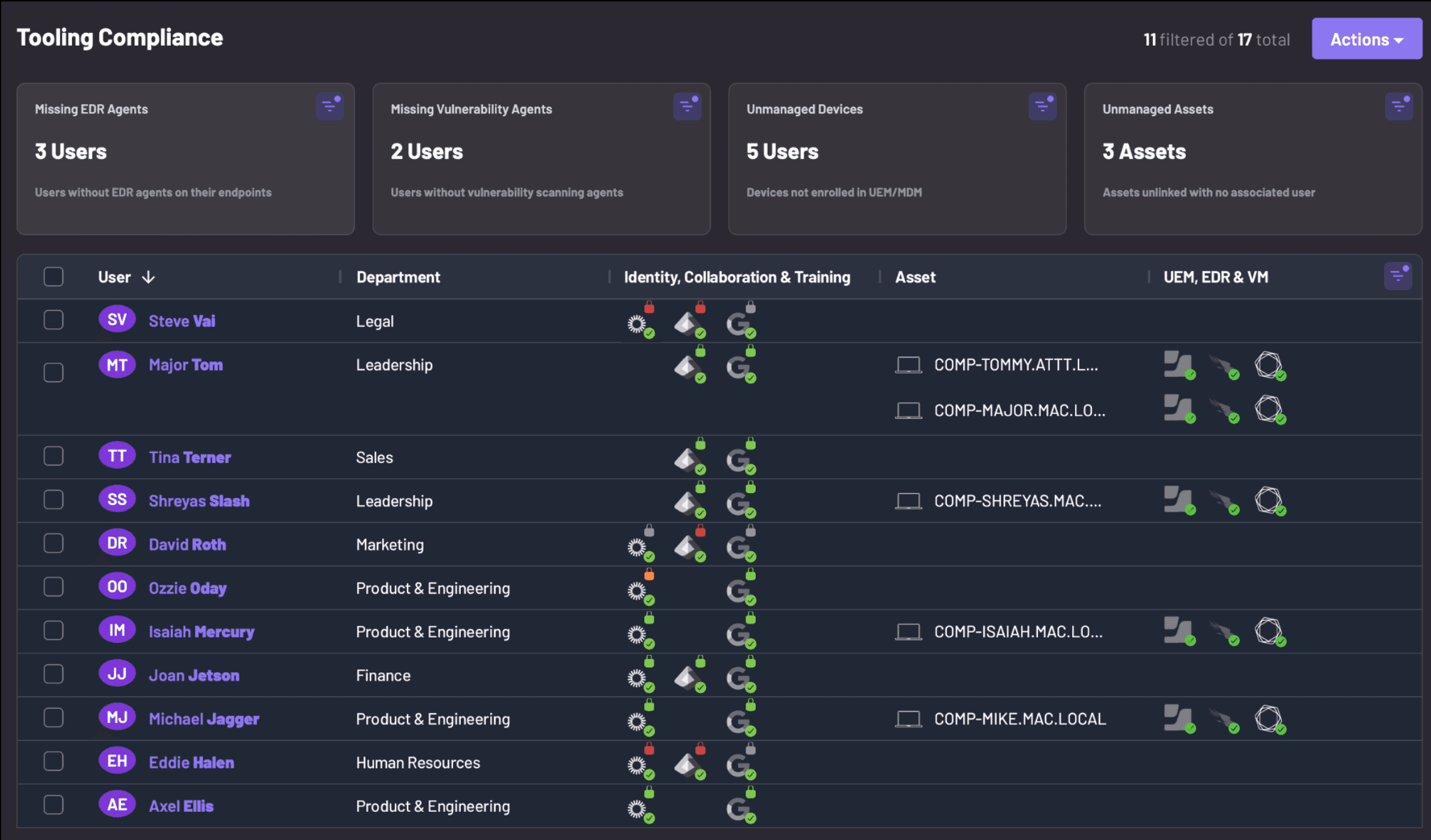
Amplifier's Security Tooling Coverage Grid
Instead of reconciling CSV exports in spreadsheets, Amplifier’s Security Tooling Coverage triangulates read-only APIs across Jamf, Intune, Kandji, Workspace ONE, Fleet, Okta, CrowdStrike, and SentinelOne without requiring its own endpoint software. In an illustrative example from customer rollouts, Jamf and Intune might show 2,000 active devices while CrowdStrike is installed on only 1,500, immediately surfacing 500 unprotected laptops alongside active machines where SentinelOne or CrowdStrike stopped checking in within the last six hours.
Step 2: Route Enriched Offline Alerts to Your Slack or Microsoft Teams Channel
Once your two-source check flags a stale device or a silent EDR sensor, send the alert to a dedicated Slack or Microsoft Teams channel with the owner’s identity and device state already attached. A channel notification only speeds up response if the engineer reading it knows whose laptop broke and whether the machine itself is online.For a manual pipeline, you can push events into Slack or Teams using CrowdStrike’s Falcon Fusion SOAR actions for Microsoft Teams, CrowdStrike Webhooks, a scheduled Power Automate flow polling Intune, or a Jamf smart group firing into an incoming webhook. Microsoft also provides built-in Teams device state rules for offline alerts, though those only cover Teams-managed collaboration hardware and cannot detect uninstalled EDR sensors.Whichever pipeline you use, format the payload so your team doesn’t have to pivot across three consoles to triage the alert:
Attributed human owner and department: Map the hostname and serial number to the actual employee and their identity group, because a raw device string like
MAC-0492tells an analyst nothing.Both check-in timestamps: Display the MDM last check-in right next to the EDR last-seen time so the channel can immediately tell a closed laptop from a dead sensor.
Asset type and routing target: Keep server, virtual machine, and unassigned loaner alerts in your IT or security operations channel, since there is no individual employee to nudge.
30-day drop history: Include how many times the sensor has gone dark in the past month so technicians know whether they are looking at a one-off reboot or chronically broken EDR software.Many security and IT teams operationalize this step in Amplifier by providing a shared Slack or Teams channel ID. When an employee’s device hasn’t checked in for three weeks or their CrowdStrike sensor stops reporting, Amplifier posts the finding to the shared channel with the person’s name and device serial number, while routing server and unmapped-device findings to an IT support channel.
Step 3: Nudge the Device Owner in Slack or Teams and Escalate After a Deadline
Posting to a security channel tells your team about the gap, but messaging the device owner directly in Slack or Microsoft Teams is what actually gets a sleeping laptop reconnected or a stalled sensor fixed. Most offline-device findings require the user to power on their laptop, reconnect to corporate Wi-Fi or VPN, reboot to finish an update, or let IT re-enroll the machine.Endpoint administrators at Jamf’s JNUC conference bring up this exact gap every year: they want an automation that alerts the team when a device stops checking in and also sends a reminder to the employee. Sending those reminders by email rarely works. Across Amplifier deployments, email reminders see only a 20% to 30% response rate because they get buried in inboxes, whereas reaching employees in Slack or Microsoft Teams drives an 80% to 90% response rate.Using Amplifier’s Device Attribution and Ampy Security Engineer, you can automate owner outreach and escalation without annoying your workforce:
Confirm ownership before you nudge: Asset tables and CMDBs go stale fast. Before messaging an employee about a missing sensor, reconcile Okta or Entra ID login signals with Jamf and Intune, or have the bot ask the suspected owner to confirm the device serial number in a quick chat.
Vet messages in a QA “ghost” channel first: Before turning an agent loose on employees, route all generated engagements to a QA “ghost” channel in Microsoft Teams. Your team can vet every engagement there and run it against individual test users before turning it on for the wider group.
Time outreach to local working hours and calendar blocks: Pull time zones, meeting status, do-not-disturb settings, and vacation flags from Teams, Slack, or Outlook, and enforce cool-off periods between messages. Never ping someone in the middle of a presentation or at 2:00 a.m.
Give one-click actions and an IT escape hatch: Let the employee schedule a reboot on their calendar, follow plain-language steps to reconnect, or click an “I need IT help” button that automatically opens a Jira or ServiceNow ticket when tamper protection blocks a self-service fix.
Enforce resolution deadlines with expiry actions: Set a clear SLA window, such as three or five days. If the device still hasn’t checked in when the timer expires, automatically escalate to the user’s manager, move the user into an escalation channel, or trigger an identity action such as logging them out of Okta or Entra ID.

Amplifier engages with employees to bring offline EDR software back online.
Step 4: Re-Query the Source API to Confirm the Sensor Is Back Online
Never close an offline-device or missing-EDR finding just because an employee clicked “Done” or restarted their laptop. Your workflow should only resolve the alert after querying the EDR and MDM APIs again to prove that fresh telemetry is flowing.As we covered in our breakdown of self-healing EDR software, a sensor shows as offline within minutes of missed check-ins (CrowdStrike’s FalconPy maintainer puts it at “a few minutes”), and a simple reboot doesn’t guarantee that the service survived startup or that an expired certificate was replaced. When employees comply with a prompt and your tooling still flags them as non-compliant, or when a ticket closes while the sensor stays dead, trust in your security program erodes fast.In a custom SOAR workflow, schedule an API poll after the user’s action window to verify that both the MDM check-in and the EDR sensor heartbeat agree, then record the total unprotected duration for SOC 2, HIPAA, or PCI DSS audit evidence. In Amplifier, production tenants run a full sync daily alongside partial delta syncs every 15 to 60 minutes, sending engagements only after a fresh data ingest so users aren’t pinged about issues they already fixed, and calling the source tool’s API back to confirm the finding has cleared. In an illustrative pattern from customer deployments, simply nudging an employee to bring an offline device back online can fix 20 different security findings tied to that user without the employee having to do anything else.
How to Set Offline Thresholds Without Drowning Your Channel in False Positives
Arbitrary timer rules will flood your Slack channel with false alarms every time an employee closes their laptop for a long weekend or goes on leave. Instead of applying one countdown to every endpoint, tune your thresholds by device state, operating system, and drop recurrence.
Start check-in thresholds wide and tighten them over time: When you first turn on stale-device alerting, start with a higher threshold (such as several days or up to three weeks [CONFIRM] for full device inactivity) and gradually shrink it as you clean up the backlog. Starting too tight on day one guarantees a flood of false alarms from employees on vacation or parental leave. [Input needed: Amplifier’s recommended starting and steady-state offline thresholds in hours/days for employee laptops vs. servers]
Alert in hours when the laptop is online but EDR is silent: If Jamf, Intune, or Okta shows a user actively working while CrowdStrike or SentinelOne hasn’t checked in for six hours [CONFIRM], treat that mismatch as an active coverage gap rather than a routine offline device.
Flag three or more drops in 30 days as broken EDR software: Borrowing a rule from Thread’s triage runbook, EDR software that disconnects and returns three or more times in a 30-day window has an underlying software conflict, broken update, or tamper issue. Open a single reinstall ticket instead of chasing repetitive one-off alerts.
Make coverage rules OS-aware and drop mobile devices: Suppress “Intune missing” alerts on macOS laptops managed by Jamf, suppress “Jamf missing” alerts on Windows machines, and filter mobile phones out of desktop EDR coverage checks before they ever reach your channel.Pairing these state-based thresholds with OS-aware filtering keeps your alert channel focused on real coverage gaps instead of routine laptop sleep cycles.
Stop Letting Offline Sensor Alerts Die in a Slack Channel
An automated alert in Slack or Microsoft Teams is where visibility starts, not where risk ends. If your workflow stops at dumping a hostname into a channel, someone on your team still has to figure out who owns the laptop, chase them down to turn it on or restart the EDR software, and check back later to see if the fix stuck. Closing that last mile means connecting your existing endpoint and identity tools directly to the people using the devices, so routine check-in gaps fix themselves and your engineers only step in when EDR software is genuinely broken. Book a demo with Amplifier Security to see how Ampy reconciles coverage gaps, nudges device owners in Slack and Teams, and verifies every fix automatically.
Frequently Asked Questions
Does CrowdStrike Falcon generate a native alert when a sensor is uninstalled?
Not as a console alert. Falcon logs an uninstall as a telemetry event called AcUninstallConfirmation, but no public source shows it raising a detection or triggering a Fusion SOAR workflow on its own, so you have to query for it and alert on it yourself. Don’t alert on the raw event, either: teams in an r/crowdstrike thread on Falcon uninstall SIEM rules found that a legitimate sensor upgrade can trip it. The fix posted there, which CrowdStrike also publishes in its community GitHub repo, flags only hosts where the uninstall isn’t followed by a sensor heartbeat. Even that has a blind spot. If someone uninstalls the sensor off-network and reboots, the local event cache is lost and the event may never reach the cloud. That’s why comparing your EDR inventory against your MDM (such as Jamf or Intune) is the backstop that catches every missing sensor.
What is the difference between a device that stopped checking in and an offline EDR sensor?
When a device stops checking in with both your MDM and your EDR at roughly the same time, the machine itself is powered down or off the network. When your MDM or identity provider shows the device actively online and authenticating, but the EDR sensor hasn’t checked in, the endpoint is running live without protection and needs immediate attention.
Should offline EDR alerts go to the security team or the employee?
Route to both, depending on what broke. Unassigned devices, servers, and tampered EDR software belong in a shared IT or security channel in Slack or Teams. When an employee’s laptop hasn’t checked in for days, needs a reboot to finish a sensor update, or dropped off VPN, nudging the device owner directly in Slack or Teams resolves the issue far faster than opening an IT ticket.
Latest Blogs
Related Blogs & News



Watch