

Your security stack is sophisticated. Your endpoint detection is live. However, somewhere in your environment, an employee is running a version of software that hasn’t received a security update in two years, and your security team is unaware of it. That’s the quiet reality behind a growing share of ransomware incidents. 44% of all breaches show ransomware, which itself increased by 45% in 2025.
Not zero-day attacks or sophisticated techniques, but old software that is well past its shelf life, which nobody ever got around to removing. Legacy applications, such as defunct versions of productivity tools like Microsoft Office, or business applications like CRM and ERP, expand the attack surface. These End-of-life (EOL) apps sit in the background, accumulate unpatched vulnerabilities, remain invisible to most security controls, and become increasingly attractive to attackers who know exactly where to look.
In a world where exploited vulnerabilities are now the leading root cause of ransomware attacks, organizations running EOL apps are essentially leaving the door open and the lights off.
Challenges Of Securing End-of-Life Apps
End-of-life software is any application or operating system for which the vendor has stopped issuing updates, patches, or security fixes. For IT and security teams, EOL announcements aren’t just dates to mark on their IT calendars; they’re deadlines with real operational and security implications. EOL apps survive in enterprise environments because they continue to perform their functions without any visible issues, and, more importantly, migrations to newer versions feel disruptive.
According to research, EOL software images accumulate an average of 218 new vulnerabilities every six months after support ends. The potential attack surface increases with each passing day the EOL app stays in your IT environment. The challenges of securing EOL apps are layered - technical, operational, and deeply human.
Design Limitations
EOL apps were designed for simpler threat environments before zero-trust and cloud infrastructure became the norm. These apps didn’t factor in the expanded attack surface that includes remote workers, mobile devices, and SaaS ecosystems.
Most of these apps rely on insecure protocols, lack encryption for data in transit, and use a basic authentication mechanism that wouldn’t pass a security review. These are structural design constraints that are difficult to fix once the vendor stops support.
Invisible Inventory
The security team can’t secure what they can’t see. Organizations often lack a complete, accurate inventory of all applications running across their environment, which limits visibility and active monitoring. EOL applications are invisible by default, not because they’re hiding, but because nobody is actively looking for them.
Shadow IT is often an ignored aspect of the EOL software problem. Employees install tools to fill productivity gaps, carry software from previous roles onto new devices, or never uninstall applications they stopped actively using. The result is a sprawling, undocumented layer of legacy software that IT teams have no visibility into and no mechanism to remediate.
Impaired Detection Capabilities
Traditional security tools such as Endpoint Detection and Response (EDR) platforms, Security Information and Event Management (SIEM), and vulnerability scanners are built to surface known CVEs on managed, inventoried endpoints. EOL applications often sit on endpoints that aren’t fully enrolled in management platforms, or they may be so outdated that automated scanning tools can’t accurately catalog them.
As EOL apps remain under the radar, they are protected only by outdated, basic antivirus (AV) solutions.
Lack of Vendor Support And Security Patches
As apps reach the end of life, the vendor stops issuing security patches. Any vulnerability discovered after that date is permanent. This creates an asymmetry that attackers exploit methodically. As vulnerabilities are discovered and recorded in public databases, threat actors scrutinise them for their next attack.
60% of data breaches stem from known, unpatched vulnerabilities, not from sophisticated attacks. EOL apps contribute significantly to the problem, with no official vendor support and security patches for known vulnerabilities.
How End-of-Life Apps Become Easy Target For Ransomware Attacks?
Ransomware operators don’t target organizations at random. They scan for specific vulnerabilities in specific software versions, using publicly available databases and automated tools. There is a 34% increase in attackers exploiting vulnerabilities to gain initial access and cause security breaches. Some most common categories of EOL software that consistently appear in breach reports.
OS Vulnerabilities
Operating systems that have passed end-of-life are among the highest-value targets in the ransomware playbook. Windows 7, Windows Server 2008, and Windows XP have well-documented vulnerability catalogs that attackers continue to exploit years after support ended.
The Cybersecurity and Infrastructure Security Agency (CISA) issued multiple alerts for active exploitation of EOL SonicWall SRA and SMA 8.x Products. However, many organizations failed to act and suffered preventable breaches that proved costly. Once an OS stops receiving patches, every new vulnerability becomes a permanent fixture of the attack landscape. The continued use of EOL OS increases endpoint exposure and limits an organization’s ability to maintain an effective security posture.
Outdated Browsers and Plugins
Browsers and browser plugins such as Flash, Java, Silverlight, and older versions of Chrome or Firefox are a persistent source of EOL risk that often flies under the radar. Employees may be running a current browser, but have outdated plugins or extensions that haven’t been updated.
Legacy web-based internal tools sometimes require specific browser versions to function, creating IT environments where people run outdated browsers as workarounds for application compatibility issues. These environments are easily fingerprinted by attackers running automated scans, and their known vulnerabilities are widely cataloged.
Legacy Communication And Collaboration Tools
Older versions of email clients, chat platforms, and file-sharing tools are often overlooked in software audits because they’re not considered security-critical infrastructure. But communication tools are high-value targets precisely because they sit at the intersection of user identity, file transfer, and external communications.
An EOL email client that lacks modern encryption, or a legacy collaboration platform that your security team can’t integrate with multi-factor authentication(MFA), is both highly exposed and deeply embedded in your organization’s daily workflow, making it an ideal initial access point for ransomware operators.
Deprecated Remote Access Software
With the rise of remote work, VPN clients, remote desktop tools, and screen-sharing applications have become the norm. When these remote access software reach EOL, they represent one of the most attractive vulnerabilities to threat actors. When they contain unpatched vulnerabilities, attackers can exploit them to gain a foothold without needing to bypass any internal controls.
Ivanti disclosed a critical security vulnerability, CVE-2025-22457, impacting Pulse Connect Secure(PCS) 9.x appliances which reached end-of-support on December 31, 2024. Ivanti has identified evidence of active exploitations of PCS 9.x appliances - devices that could not be patched because support had already ended.
Insecure Integrations and APIs
Legacy applications weren’t designed to integrate with today’s ubiquitous cloud-native or API-driven ecosystems. As a result, organizations often build custom connectors or rely on unencrypted API endpoints to keep apps operational. These integrations are frequently misconfigured, lack authentication controls, or fail to encrypt traffic. Attackers leverage these weak integrations to move laterally from the EOL app into critical business applications.
Additionally, the lack of encryption and MFA in legacy applications leaves organisations vulnerable to ransomware attacks.
Why Your Security Controls Fall Short Against EOL Risk
Your security stack is doing its job. Threats are being detected. Alerts are firing. Findings are piling up in dashboards. But here’s the uncomfortable truth: detection is only half the equation. What happens after that alert is generated? In most organizations, not fast enough.
The Detection-to-Remediation Gap
Security tools were built to find problems, not fix them. There’s a significant gap between the moment a finding is generated and the moment your team actually takes action to resolve it. The average time to contain a breach involving unpatched vulnerabilities is 73 days. That’s 73 days when the vulnerable application sits in your environment, visible to any attacker running an automated scan. Detecting a risk faster doesn’t close that window unless you mitigate it just as quickly.
Manual Workflows Slow Resolution
CIOs and CISOs have delayed patches specifically to avoid business disruption, and the patches they believed had been deployed hadn’t actually reached all devices.
Think about how your team responds to a security finding today. A ticket gets created. Someone gets assigned. And then you wait. The problem is that ticket queues don’t resolve on their own. Every handoff in your ticket-based workflow is a point of failure. And with EOL software, every day that the ticket sits unresolved is another day the door stays open.
Training Alone Doesn’t Remove the App
Your annual security awareness training tells your employees that legacy software is risky. What it doesn’t do is identify the specific EOL application sitting on their device, explain why that particular app puts them and your organization at risk, or guide them through removing it right now. Training helps you build general awareness, but doesn’t drive desired action. You need an effective follow-up mechanism to translate awareness into mitigating action.
The Human Factor
Even when your security team detects an EOL app, the responsibility for addressing it usually falls on the employee whose device it is installed on. That’s not because your employees don’t care; it’s because they don’t have clarity about the process or context for taking corrective steps. The tools designed to engage them with security risk aren’t built to drive action. Awareness without a real engagement layer yields knowledge without behavior change, which is not enough to close vulnerabilities.
Bad Remix For Removing Risky Legacy Software
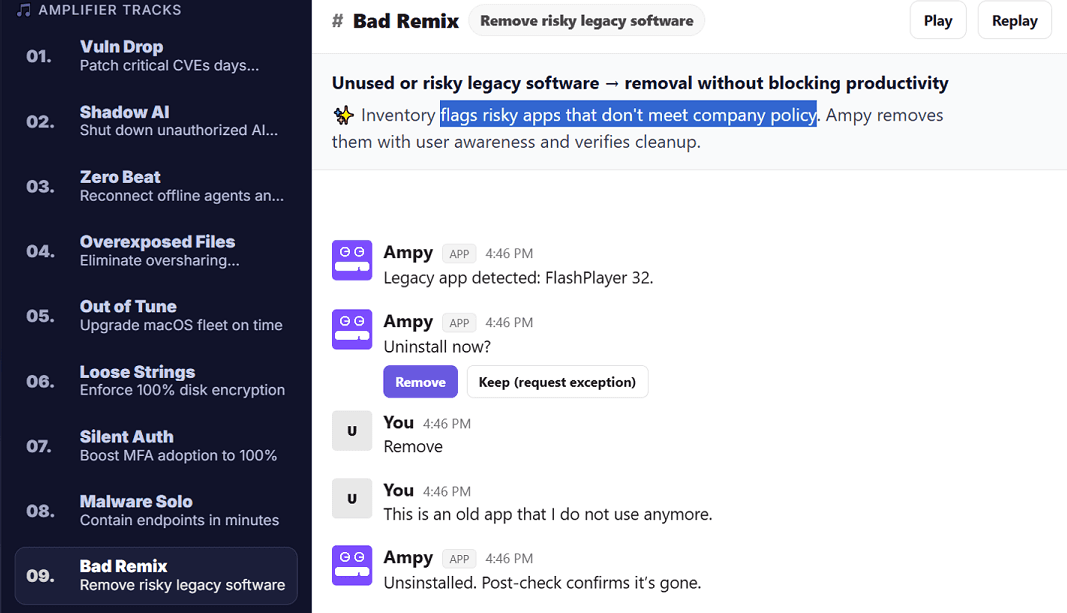
Amplifier Security’s Bad Remix is a prebuilt AI-enabled solution for identifying and removing risky legacy software from your environment. It addresses the problem end-to-end with detection, real-time employee engagement, and verified remediation.
From Detection To Employee Action In Real Time
Bad Remix integrates with the security and endpoint management tools you already have, such as Jamf, CrowdStrike, Microsoft, Okta, and others. It tracks your inventory and flags risky apps that don’t meet company policy. Instead of routing those findings to a ticket queue, Amplifier’s AI platform processes the signals. It engages the employee directly — in Slack, Microsoft Teams, or any other collaboration tool they already use. The message is clear and actionable: here’s the risk app, and it needs to be removed.
Employees can agree to uninstall immediately, schedule the action, or request an exception without involving the help desk.
Automated Follow-Up
Manual follow-up is where remediation programs consistently break down. Amplifier automates the entire follow-up cycle. If an employee doesn’t act, the platform sends a reminder. If the issue remains unresolved past a defined threshold, it escalates automatically with a full audit trail and context for the security team.
Verified Resolution Through the Human Risk Graph
Bad Remix is powered by Amplifier’s Human Risk Graph — the industry’s first unified model mapping identities, devices, vulnerabilities, and behaviors in a single view. When an employee resolves an EOL app issue, Amplifier confirms the removal through integration with endpoint tools and updates the risk graph automatically. Security teams don’t have to worry whether EOL issues were addressed as they have verified proof.
Turning EOL Risk Into Resilience
In 2025, there was a 34% increase in attackers exploiting vulnerabilities to gain initial access and cause security breaches compared to the previous year. With unpatched vulnerabilities and near-certainty that nobody is actively monitoring, EOL apps offer threat actors a perfect entry point to breach a network and install ransomware.
Most security teams know EOL software is a problem that will persist. The challenge isn’t awareness but bridging the gap between knowing a risk exists and the employee action required to eliminate it in real time, at scale, without blocking productivity.
Amplifier’s Bad Remix helps you identify EOL apps, engage employees in real time, and deliver verified remediation without tickets, manual processes, or productivity disruption. Book a demo to see it in action.
Latest Blogs
Related Blogs & News



Watch