

When Apple releases a critical patch, the best IT teams move like a well-rehearsed band playing their set. Jamf notifications on day one, an email to affected employees by afternoon, and Slack follow-ups the next morning.
The results pour in fast. Within 24 hours, 34% of the fleet has updated, and by the end of the week that number could soar past 61%. But even with a perfectly executed enterprise macOS security program, progress slows and eventually plateaus. By the end of the month, one-in-every-five devices may still be unpatched. Some linger on outdated OS versions for months.
The macOS update automation tools worked. The security policy was clear. And yet the fleet is still out of tune: hundreds of vulnerable devices continue to be used, each one a target that attackers are actively pursuing.
The point of failure has often been treated as technical or operational. But the real problem is that this moment — the patch handoff from IT to the end user for installation — has never truly had a real owner. The end user defers the update because they’re busy with work. Security and IT let it languish because they don’t have the bandwidth to follow up on every device. No one dropped the ball, but no one picked it up either.
This gap between deployment and installation is why macOS patch compliance keeps showing up as a top audit finding (and in breach reports). And it will keep showing up because modern security stacks were never designed to own the moment between the notification and the action. The question we need to answer is who that should be — and whether it even needs to be a person at all.
How macOS Updates Work, and Where They Break Down
Apple delivers macOS updates in three tiers, each with different urgency and deployment implications.
Major OS releases ship, on average, once a year — like the recent move from macOS 15 Sequoia to macOS 26 Tahoe. These introduce new features, security architectures, and system-level changes that need real testing. Most organizations use Apple’s 90-day deferral window to validate compatibility before broad rollout.
Minor updates are version bumps released periodically to patch bugs and vulnerabilities discovered after the major release. Last December, Apple released macOS Sequoia 15.7.3 as a security-focused maintenance update addressing memory corruption flaws and logic errors that allowed apps to access sensitive data, bypass protections, and gain elevated privileges.
Rapid Security Responses are Apple’s answer to zero-day vulnerabilities that need immediate fixes. They bypass the normal update queue entirely, delivering critical security patches between standard software updates — browser-level fixes for Safari and the WebKit framework stack, for example.
Apple’s declarative device management makes managing update compliance straightforward. It plays well with existing MDM tools like Jamf, providing options to enforce software updates, deploy configurations, and maintain an up-to-date view across managed devices.
Apple’s 90-Day Deferral Window
The deferral window lets enterprises control when updates appear to users, giving teams time to test new OS versions for compatibility before wider deployment. It’s a useful tool, but it has real limitations.
Organizations can specify a custom deferral period from 1 to 90 days. Once the window closes, the update appears as if it were just released via a standard notification. During the deferral period, the update is invisible in System Settings — and if multiple updates land during your testing window, users suddenly see them all at once when the deferral expires.
The deferral window also cannot exceed 90 days, even if critical internal apps remain incompatible. Critical security updates often bypass deferrals altogether. And since security improvements only apply to the latest version, deferring minor updates also defers the security fixes they carry.
The machinery works, especially when combined with fleet management tools like Jamf. Where it breaks down is further downstream, where friction delays installation and lack of ownership means there’s never enough momentum to push noncompliant devices over the line.
The Human Psychology Problem That Security Stacks Can’t Solve
Security teams have spent years improving the patch deployment side of the macOS update process. MDM tools detect unpatched devices in real time. Policies set deferral windows. Configured enforcement deadlines push timely patches while still allowing for testing.
What’s missing is what happens next — the last mile. The update sits queued, waiting for the end user to install it. But the end user defers, and the outdated OS finding sits in a dashboard shared by IT and security. The issue isn’t negligence. It’s that all of these stakeholders genuinely have too many priorities that take precedence.
Installing a new patch is inconvenient. Automatic updates get scheduled overnight when the laptop is off, pushing them to the next morning where the user defers because they get in the way of meetings and project deadlines. For security and IT teams, the process of mapping every noncompliant device to its owner and trying to corral them disrupts higher-value tasks. Getting devices standardized on the latest OS is important, but it’s boring work — and sometimes even uncomfortable if the user in question is senior leadership.
When you multiply that dynamic across the 10+ security updates Apple releases each year, you start to understand why patch management keeps surfacing as a top SOC 2 Type II finding. But the cruelest part is that this gap will eventually force an emergency response when it’s exploited, and the bill will be paid in a way that’s far more agonizing than installing a patch and chasing down end users.
How Delayed Updates Create Real Security Risk
When a CVE drops, a ticking clock starts. Not for Apple, but for attackers. Because many of these patches get delayed for testing or postponed by the end user, attackers know they have a window to exploit the vulnerability even after Apple has released the fix.
You don’t have to look far back to find examples. DarkSword is a recent exploit chain discovered by Google’s Threat Intelligence Group that targets a WebKit vulnerability (CVE-2025-31277) that Apple already patched. The DarkSword loader specifically checks the fingerprint of the device and only launches payloads when older, vulnerable iOS/macOS versions are detected.
The security exposure from out-of-date OSes is obvious. But the gap between security update and patch installation has other downstream consequences:
Security vulnerabilities compound. Every passing day a patch is postponed, risk increases and vulnerabilities multiply. Running several different macOS versions across your fleet means your attack surface grows with every deferred update. Stacking patches also creates user friction — more notifications, more restarts, more “Remind me tomorrow.”
Compliance and audit failures follow. Patch lag creates documented evidence of security control failures that directly jeopardize your certification status and insurability. Failing an audit — whether it’s SOC 2, ISO 27001, or any other framework — means fines and redesigned patch deployment processes to conform with their standards.
Operational disruption escalates. Postponed patches create more work for your IT and security team. Instead of anticipating threats, they’re reacting to compromised machines. Ticket volumes explode, strategic priorities get delayed, and remediation efforts are felt acutely across the company.
Reputational damage accumulates. Security incidents put your customers at risk. When you respond to RFPs, you must provide patch SLAs and vulnerability management metrics. Poor patch hygiene can cost you a deal.
Security isn’t just a risk function anymore. And that’s why this last mile problem can’t be ignored. Someone needs to own it — there’s just too much at stake.
The Last Mile Needs an Owner — Here’s How AI Agents Are Filling the Gap
Traditional MDM enforcement gets you to 80%. The last 20% — that one-in-five devices lingering on an outdated OS — can be remediated with an AI security agent. It’s the perfect use of AI: not to replace security engineers and IT analysts, but to own and execute the tedious fundamentals at scale.
With AI security agents, the question shifts from “how to automate macOS updates for the enterprise” to “how to make the patch deployment experience better for everyone involved.” They serve two critical roles in making this transition:
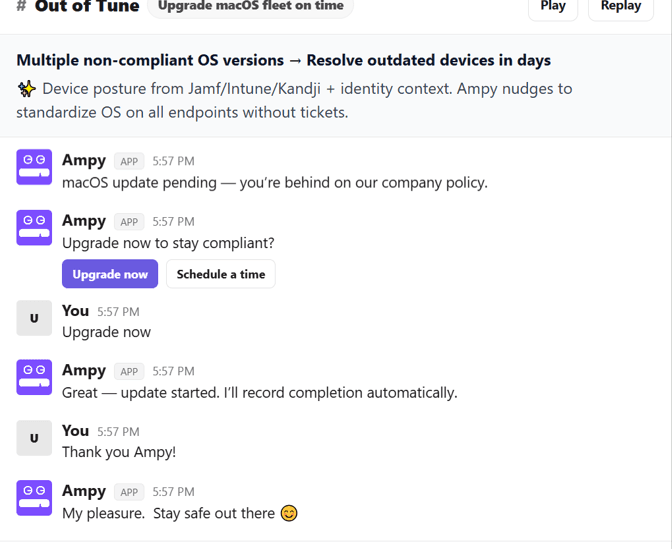
Contextual User Engagement. AI security agents act as the concierge of the installation process. They don’t just flash “security update required” notifications at users — they engage with them personally to explain the stakes of the vulnerability, answer questions, and schedule the installation. You’re no longer expecting Dave the accountant to understand what CVE-2024-44308 means to him. Instead, Ampy explains that Dave’s outdated OS could expose him to a ransomware attack that locks him out of critical files during tax season. That’s going to motivate Dave to install the patch sooner rather than later.
Autonomous Chase Down and Reporting. AI security agents handle the boring work your IT team doesn’t want to do. This includes following up with users to schedule installation, managing escalations, verifying installation, and closing and recording findings for audit purposes. In a fleet of 500 devices on different OS versions, this can save your IT team hundreds of hours of work while closing critical security gaps faster.
Amplifier augments the traditional patch management process with a workforce security posture management platform and an AI security agent. Amplifier integrates with Jamf, Kandji, and Intune to identify unpatched macOS systems, correlating each CVE finding with the employee’s identity context and risk profile.
When a high-risk device is identified, Amplifier’s AI security agent Ampy gets to work. Ampy comes with the Out of Tune track — an automation designed specifically to walk the employee through remediating noncompliant OS versions. Once triggered, Ampy reaches out to the device owner through Slack, Teams, or email and nudges them to update now or walks them through scheduling it at a more convenient time, all while answering questions and explaining context.
Ampy handles every follow-up automatically, escalating based on urgency and response patterns. Successful installs are verified and cleared from the compliance dashboard in real time. Letting Ampy take ownership of this last mile means security teams wake up to closed findings and IT teams leave work with an empty ticket queue.
Take Control of Your macOS Security Posture
The macOS patch problem isn’t going away. Apple will keep releasing updates. Attackers will keep weaponizing the window between release and deployment. Compliance frameworks will keep tightening.
What needs to change is the last mile of macOS patch management. For years, security teams have treated patch delays like a technology failure. But it’s actually an ownership failure — which is good news, because that’s a problem that can be solved.
The gap between notification and installation just needs someone who can show up at the right moment, with the right context, for every employee, every time. That’s not a job for an IT team stretched across competing priorities. It’s a job for an AI that never has a full plate.
That’s what Ampy was made to do. See how many devices in your fleet are sitting in that gap.
Frequently Asked Questions
How do delayed macOS updates create security risk for enterprises?
Every macOS security patch Apple releases is a signal to attackers that a vulnerability exists and can be exploited on unpatched devices. Exploit kits like DarkSword, discovered by Google's Threat Intelligence Group in 2025, specifically fingerprint devices and only deploy payloads against older, unpatched OS versions. The window between patch release and actual installation across an enterprise fleet is typically weeks or months, not days — and that gap is where the real risk lives. Enterprises running multiple macOS versions simultaneously face a compounding attack surface, plus stacked patches create user friction that makes each subsequent update even harder to push through. Beyond the direct security exposure, delayed updates create documented compliance gaps that jeopardize SOC 2 and ISO 27001 certifications and can surface as findings during audits or RFP security reviews.
What is the macOS 90-day deferral window and how does it affect patching?
Apple's 90-day deferral window is an MDM policy that lets enterprises delay the appearance of macOS updates in System Settings for 1 to 90 days after release, giving IT teams time to test compatibility with internal applications before rolling out to users. Once the deferral expires, all withheld updates appear simultaneously as standard notifications, which can overwhelm users with multiple pending updates. Critical security updates and Rapid Security Responses can bypass deferrals entirely, and the 90-day maximum is a hard ceiling regardless of app compatibility status. The most important limitation is that security improvements only apply to the latest macOS version, so deferring a minor update also defers the security fixes it contains. Enterprises using deferral windows should pair them with an active engagement strategy to ensure employees install updates promptly once the window closes, rather than letting notifications pile up and get dismissed.
How can AI help automate macOS patch management beyond what MDM tools do?
MDM tools like Jamf, Kandji, and Intune handle patch detection, policy enforcement, and deferral management effectively, but they typically get enterprise fleets to around 80% compliance before progress stalls. The remaining 20% — devices whose owners defer updates, work remotely, or simply ignore notifications — represent a human engagement problem that MDM wasn't designed to solve. AI security agents like Amplifier's Ampy address this gap by reaching out to individual employees through Slack, Teams, or email with personalized context about why their specific device needs updating, what vulnerability it's exposed to, and what the real-world consequences could be. Unlike generic push notifications, AI agents handle the full follow-up lifecycle: scheduling convenient update windows, answering employee questions, escalating to managers when needed, verifying successful installation, and clearing compliance findings automatically. This shifts macOS patching from a reactive ticket-driven process to a proactive, AI-driven engagement model that closes the last mile without consuming IT bandwidth.
Latest Blogs
Related Blogs & News
Watch